Engineering
One camera, three surfaces: flattening the world in 360
Why the edges of a 360 panorama stretch as you zoom out, which projections fix it, and why all three fit in one line of shader.
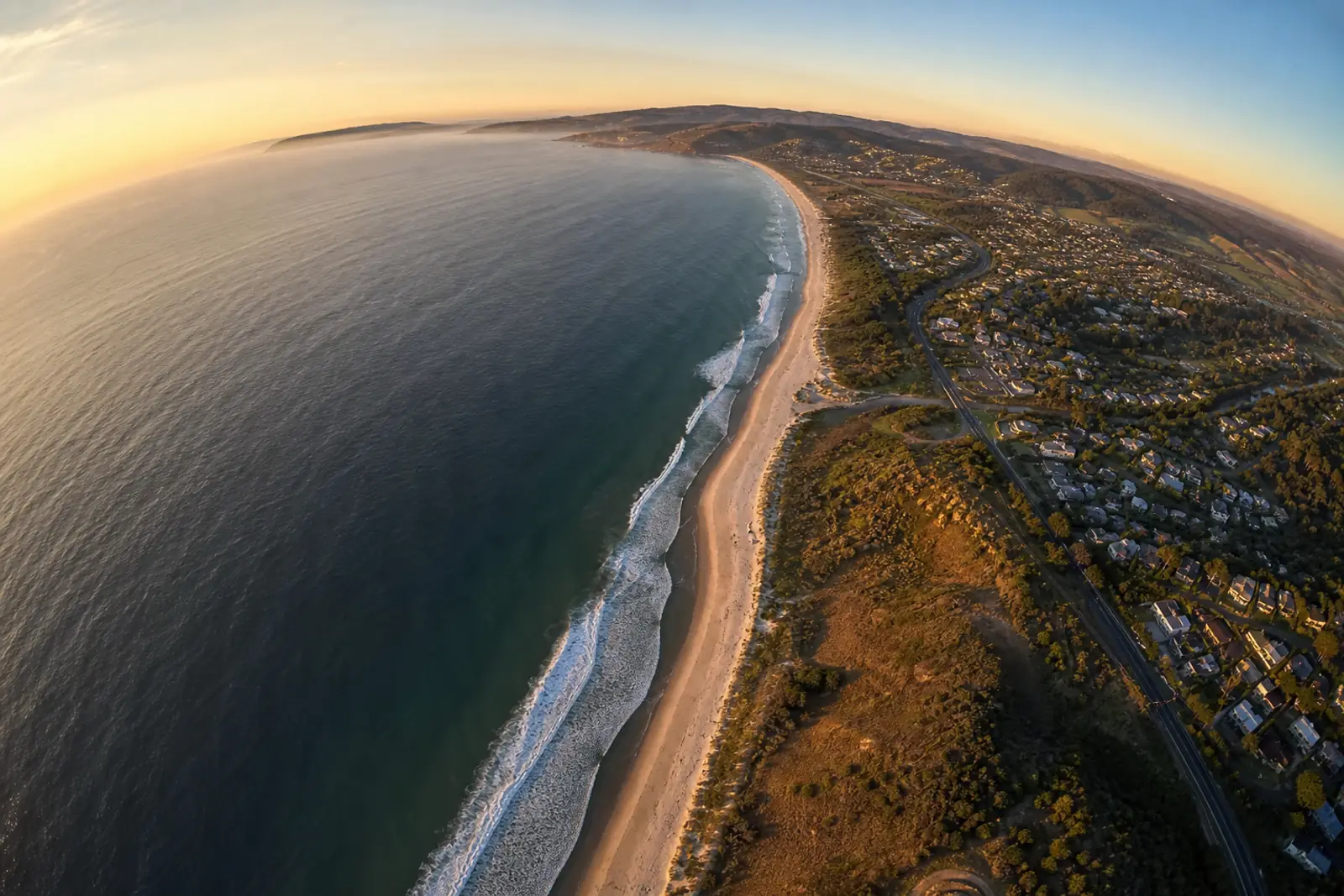
Open any aerial virtual tour - ours included - and zoom all the way out. Look at the corners of the screen: the umbrella pine turns into a floor mop, the edge of the beach stretches like toffee. Zoom in a little and everything goes back to normal.
That is not a bug, and it is not your screen. It is a theorem. And as often with theorems, you do not violate it - you negotiate.
This article tells the story of the negotiation: why the edges stretch, which projections exist to fix it, why there is no one right answer but one per kind of image, and how our engine serves all three with a single line of shader between them.
The price of straight lines
A 360 panorama is a sphere of image with you at its centre. The screen is flat. So you have to project - and every projection chooses what to sacrifice; cartographers have been fighting over this since Mercator.
Everybody’s default choice - ours, Google Street View’s, your camera’s - is the rectilinear projection: you stretch a plane in front of the camera and punch each ray of light through it.
Its virtue is unique, and it is the reason for its hegemony: it is the only projection that keeps every straight line straight. A jetty stays a jetty, a door stays rectangular.
The price is written into the trigonometry: the apparent size of objects grows as
1/cos²θ as you move away from the centre of the image.
| Angle from centre | Magnification |
|---|---|
| 0° | ×1 |
| 45° | ×2 |
| 60° | ×4 |
| 75° | ×15 |
At a narrow field of view it is invisible. But a 360 player lets you zoom out far beyond any photographic lens.
Stretching at the edge of the screen
×15
At 150° of field, the edge of the image is magnified fifteen times and the corners twenty. There is your floor mop.
Photographers know this instinctively - it is the stretching of faces at the edge of a group photo shot at 16 mm.
The first reflex, honest but frustrating, is to cap the field of view: most players stop around 120°. That amputates the zoom-out - and for drone panoramas whose entire point is to take in a whole estate, it amputates the product.
Second projection: preserve shapes
There is a projection that makes the opposite sacrifice: the stereographic. It is conformal - it preserves shapes locally. A tree in the corner stays a tree, a circle stays a circle, at any eccentricity. Its price: straight lines bend.
You know it without knowing it: pushed to the extreme, it is the little planet, the miniature globe our tours open on.
The modern idea is not to choose once and for all, but to slide continuously from rectilinear towards stereographic as you zoom out.
At a narrow field, perfect lines; at an extreme field - where nobody reads the image as a “photo” any more - shapes preserved, and a gentle curvature that passes for natural wide-angle.
And geometry gives coastal landscapes a present.
The one genuinely straight line in a coastal panorama is precisely the one the projection spares.
Third projection: preserve verticals
That leaves one case the stereographic serves badly: architecture. In a living room or a hotel courtyard, the eye forgives everything except one thing - leaning walls. There is a projection cut for that, and it is three centuries ahead of our shaders.
Giovanni Paolo Panini painted Roman vedute - whole squares, basilica interiors - on canvases covering far more field than any classical perspective allows without monstrous distortion.
His trick, since formalised as the Panini projection: gently compress the horizontal angles, like the stereographic, while keeping the vertical projection of a classical perspective.
The result: every vertical stays straight and vertical, so do the radials running to the centre, and only distant horizontals curve. The centre of the image is rigorously identical to a normal photograph - the magic only works towards the edges.
It is the projection of architectural panorama software, and it is what interior tours expect.
The twist: it is the same camera three times
Here is the part that made us smile while implementing it. Those three projections look like three different mathematical worlds.
In reality, it is exactly the same camera - an ordinary, linear perspective, the one
every GPU knows how to project with a 4×4 matrix - pulled back a distance d behind the
centre of the panorama.
What changes is the surface the points are laid on before being photographed.
| You project… | …and you get |
|---|---|
the image plane itself (d = 0) |
the rectilinear perspective |
| the unit sphere | the fisheye → stereographic continuum |
| the unit vertical cylinder | the continuum → Panini |
Two identities close the loop. On the sphere, a screen ray at angle φ reaches the image
at angle θ = φ + asin(d·sin φ): at d = 1, θ = 2φ - the angle doubling, the signature of
the stereographic known since antiquity.
On the cylinder, projecting from the pulled-back camera gives back, word for word, the
Panini formulae used by panorama software, and d = 1 is classic Panini. One parameter, two
surfaces, three renders.
For the engine, that is a gift. Our panoramas are streamed as multi-resolution tiles drawn by the GPU; the pulled-back camera stays a linear projection, so the existing matrix does all the work.
On one condition: that the vertices sit on the right surface. We subdivide each tile into a 16×16 grid and the vertex shader places each vertex:
vec3 s = (uSurface == 0)
  ? normalize(p)                                  // sphere
  : p / length(p - dot(p, uUp) * uUp);            // cylinder
That is the only difference between fisheye mode and Panini mode: a normalisation against a division by the horizontal norm.
Triangles for the whole sphere
≈ 49,000
The 16×16 grid per tile keeps the geometric error of the subdivision below one pixel at 1080p.
Nothing at all for a 2020 phone. And the full resolution of the tile streaming is preserved in every mode, at every zoom level.
Who chooses? Whoever knows the image
There is no universally good projection - there are images.
Which is why the choice appears neither in the player nor under the visitor’s fingers - they should never have to know what a projection is - but in the editor, as a tour setting, next to the little-planet intro and the autorotation.
The author chooses once, knowing their content; the visitor sees only one thing: they can take in the whole panorama, and the corners no longer smear.
What to take away
Edge stretching in 360 is not an implementation flaw: it is the contract of the rectilinear projection, the same one that guarantees the straight lines.
Good players do not “correct” it, they negotiate - sliding towards a conformal projection, which preserves shapes, or a cylindrical one, which preserves verticals, precisely in the zoom range where straight lines matter less than the rest.
And sometimes geometry is generous: three projections, one camera, one line of shader between them - and the horizon staying straight, for free.
Développeur et télépilote de drone. Construit Moorea au sein d’Elvn Studio.
Further reading
 Drone & capture
Street View: what Google closed, and what it left open
The app went in 2023, the photographer programme in 2024, the publishing interface stayed. What those three dates change for anyone selling 360 capture.
6 min read
 Drone & capture
How sharp does a virtual tour need to be?
Megapixels say nothing about the sharpness of a 360 panorama. The only metric that counts is angular density, in pixels per degree.
5 min read
 Drone & capture
The nadir logo, and the real zenith problem in drone work
On the ground, the hole in a 360 panorama is under your feet and a logo covers it. On a drone it is above your head, and no logo fills that.
5 min read
A place worth showing from above?
The free plan is enough to publish a first tour and show it around.